
AI / API Gateway
AI / API Gateway
AuthZEN Standard Security
Enforce standardized authorization for every API and AI request at the gateway layer. Built on the OpenID Foundation AuthZEN specification and Zero Trust principles.
Get Started
AuthZEN Authorization Gateway
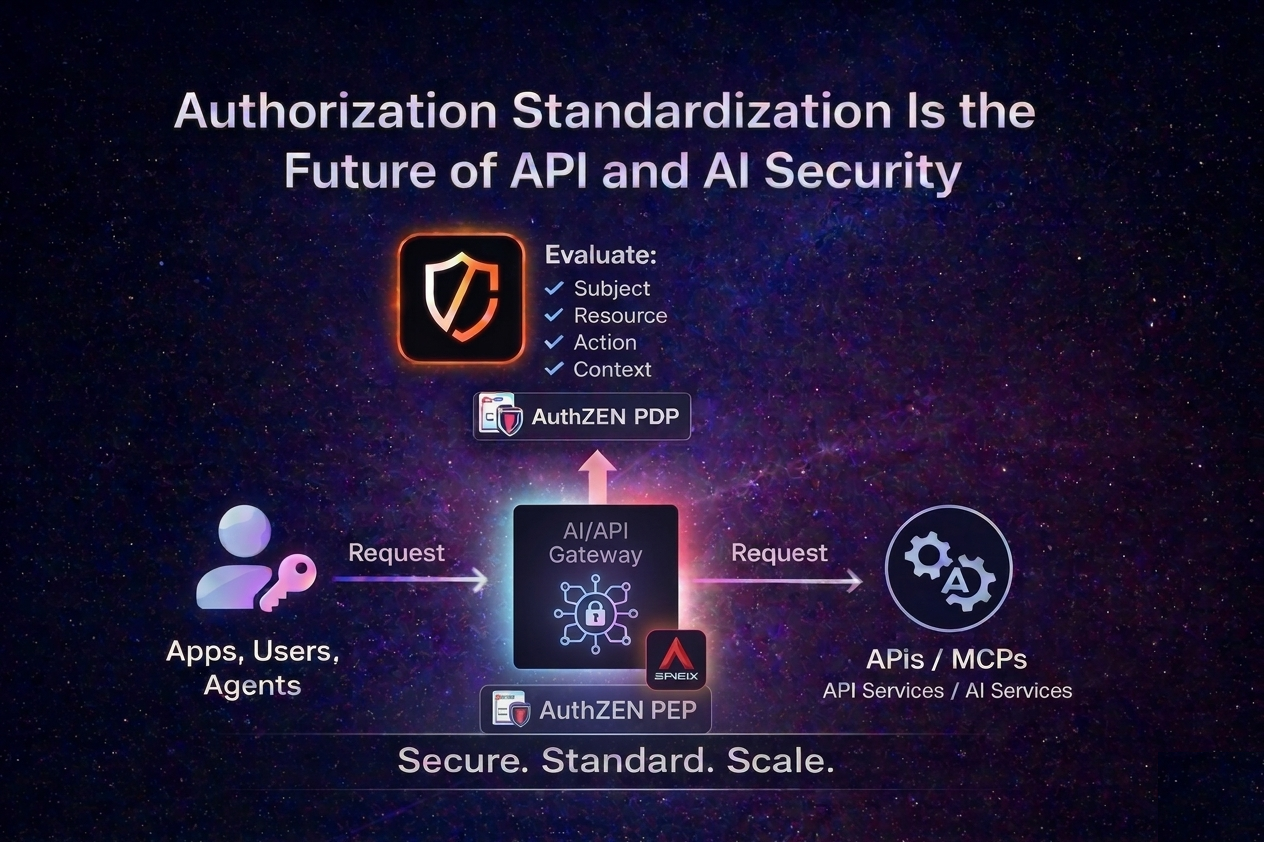
The AuthZEN AI / API Authorization Gateway turns your gateway into a centralized authorization control point for APIs and AI workloads. It acts as an AuthZEN-compliant Policy Enforcement Point, integrating with any AuthZEN-compliant PDP without embedding authorization logic into your applications.
AuthZEN Gateway Security Scenarios
The gateway supports multiple authorization scenarios:
API Security with Policy-Based Access Control (PBAC)
Enforce API protection using structured policies based on roles, attributes, and authentication context, integrated with an AuthZEN-compliant PBAC PDP.
API Security with Relationship-Based Access Control (ReBAC)
Authorize access dynamically based on relationships between subjects and resources, integrated with an AuthZEN-compliant ReBAC PDP.
MCP Security
Secure MCP services by exposing them through the gateway and delegating authorization to your PBAC or ReBAC AuthZEN PDP.
MCP Apps Security
Secure MCP Apps by exposing the interactive UI based on the gateway and delegating authorization to your AuthZEN PDP.
API Basic Case: A Quick Look at How It Works
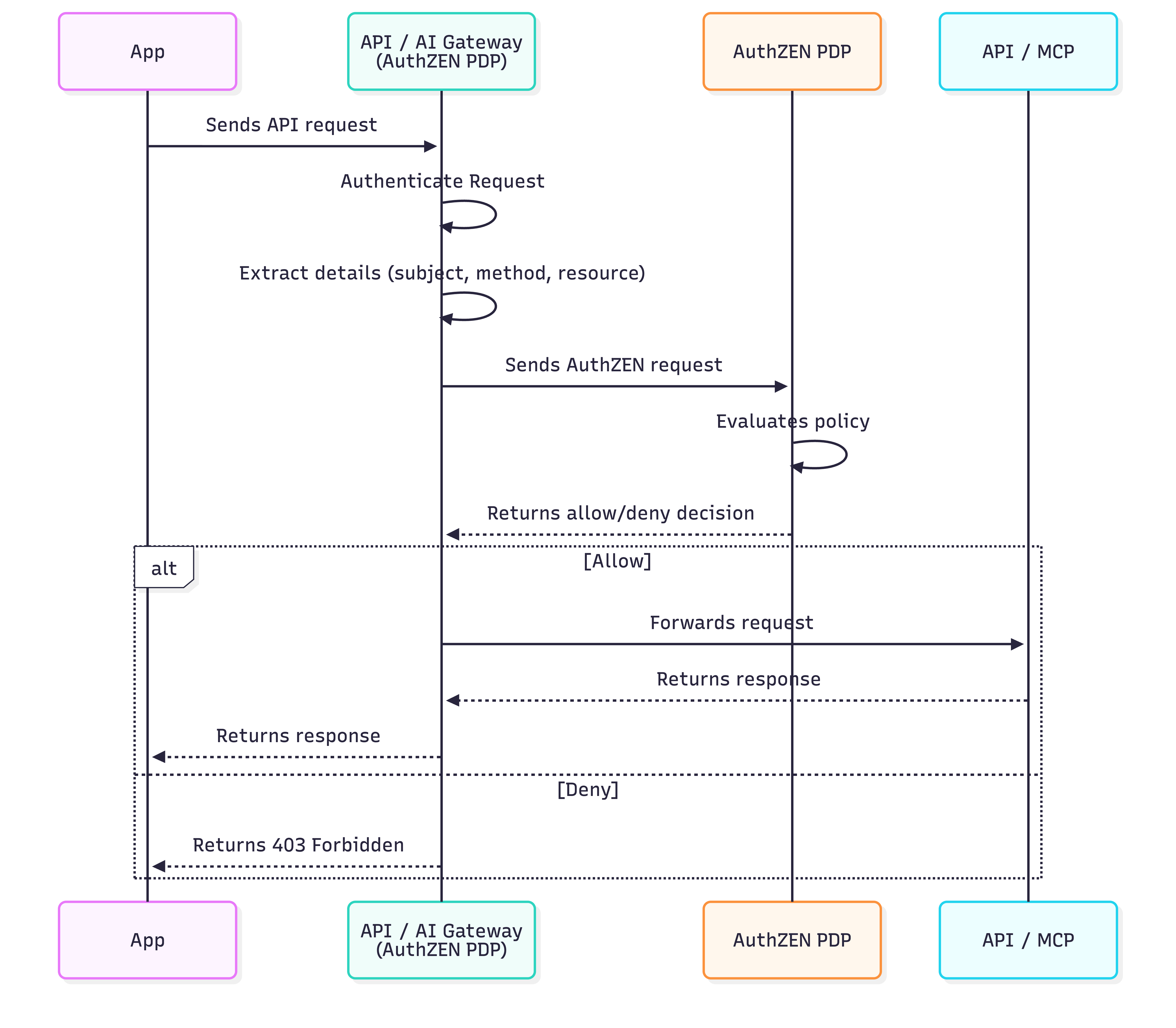
When you expose an API protected by OAuth and the AuthZEN standard, the plugin automatically builds an AuthZEN request and sends it to the configured AuthZEN PDP.
{
  "pdp": {
    "host": "https://<your-authzen-pdp>",
  },
  "subject": {
    "type": "<subject_type>",
    "id": "<subject_identifier>",
    "properties": {}
  },
  "resource": {
    "type": "<resource_type>",
    "id": "<resource_identifier>",
    "properties": {}
  },
  "action": {
    "name": "<action_name>"
  }
  "context": {
  }
}
The PDP evaluates the request against its policies and returns a decision. Thanks to AuthZEN standardization, you can:
{
"pdp": {
"host": "https://<your-authzen-pdp>",
},
"subject": {
"type": "<subject_type>",
"id": "<subject_identifier>",
"properties": {}
},
"resource": {
"type": "<resource_type>",
"id": "<resource_identifier>",
"properties": {}
},
"action": {
"name": "<action_name>"
}
"context": {
}
}Centralized authorization decisions
Decoupled authorization logic is in control of the journey
Interoperability across AuthZEN PDPs
Built on ZeroTrust principles across your API and AI authorization workflows
Example Cases
API Security Use Cases
PBAC Example Use Case
API Security based Policies
This example demonstrates policy-based access control (PBAC), where decisions are based on explicit policies defined around roles, attributes, and authentication context.
Authorization Requirement
Only admin users authenticated with a phishing-resistant authenticator are authorized to access confidential documents based on their roles and tenant.
Plugin Configuration
AuthZEN configuration:
{
  "pdp": {
    "host": "http://cerbos:3593",
    "platform": "cerbos"
  },
  "subject": {
    "type": "user",
    "id": "claim::preferred_username",
    "properties": [
      { "key": "roles", "claim": "realm_access.roles" },
      { "key": "tenant", "claim": "organization" },
      { "key": "acr", "claim": "inherence" },
      { "key": "amr", "claim": "passkeys" }
    ]
  }
}
Plugin Logic
preferred_username, acr, amr, and other relevant claims from the JWT.resource set to the HTTP URI and action set to the HTTP method, following the AuthZEN REST API Gateway Profile.{
"subject": {
"type": "identity",
"id": "embesozzi",
"properties": [
{ "key": "roles", "claim": "admin" },
{ "key": "tenant", "claim": "tenant-1" },
{ "key": "acr", "claim": "inherence" },
{ "key": "amr", "claim": "passkeys" }
]
},
"resource": {
"type": "route",
"id": "/api/tenant-1/documents/confidential"
},
"action": { "name": "GET" }
}EFFECT_ALLOW or deny.ReBAC Example Use Case
API Security based Relationships
This example demonstrates relationship-based access control (ReBAC), where permissions depend on relationships between users and roles, policy as data.
Authorization Requirement
Only authenticated analyst users can view documents.
Plugin Configuration
AuthZEN configuration:
{
  "pdp": {
    "host": "https://openfga-pdp",
    "platform": "openfga"
  },
  "subject": { "type": "user", "id": "claim::sub" },
  "resource": { "id": "view-documents", "type": "role" },
  "action": { "name": "assignee" }
}
Plugin Logic
sub from JWT.{
"subject": { "type": "user", "id": "214cc559-1bd1-4436-ab82-621f3a414b34" },
"resource": { "type": "role", "id": "view-documents" },
"action": { "name": "assignee" }
}assignee relation with view-documents.Advance Case: AI Security with Multiples Policy Enforcement Points
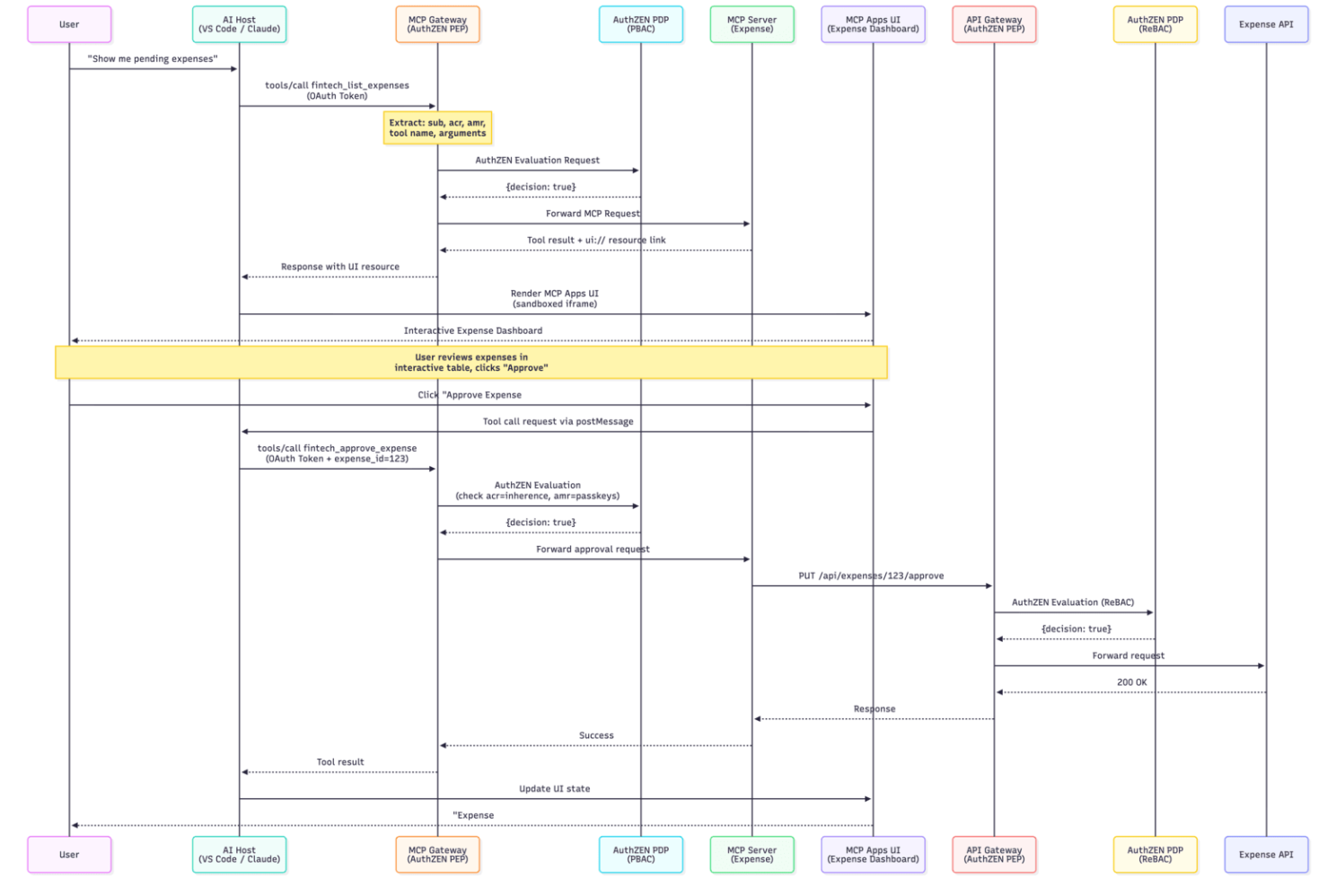
When you expose an MCP Server or MCP App you can configure the AI Gateway (PEP #1) with MCP capabilities such as Dynamic MCP Request, which lets you configure which MCP methods trigger authorization checks (e.g., tools/call), and Dynamic MCP Request Mapping, which allow you to build authorization policies based on the MCP request context, including tool names and arguments.
{
  "pdp": {
    "host": "https://<your-authzen-pdp>",
  },
  "subject": {
    "type": "<subject_type>",
    "id": "<subject_identifier>",
    "properties": {}
  },
  "mcp": {
    "enforce_on": {
      "methods": ["tools/call"]
    }
  },
  "resource": {
    "type": "<resource_type>",
    "id": "<resource_identifier>",
    "properties": {}
  },
  "action": {
    "name": "mcp::tool::name"
  }
  "context": {
  }
}
Then you can add other AuthZEN API Gateway (PEP #2) instance closer to the API with your desired authorization logic as well.
{
"pdp": {
"host": "https://<your-authzen-pdp>",
},
"subject": {
"type": "<subject_type>",
"id": "<subject_identifier>",
"properties": {}
},
"mcp": {
"enforce_on": {
"methods": ["tools/call"]
}
},
"resource": {
"type": "<resource_type>",
"id": "<resource_identifier>",
"properties": {}
},
"action": {
"name": "mcp::tool::name"
}
"context": {
}
}
Live Demo
Gateway Security Demo: Expense Management MCP App
Placed in front of the MCP server, the MCP Gateway enforces real-time authorization for MCP tool calls and UI interactions via an external PBAC system. Only analysts authenticated with a phishing-resistant authenticator can view and approve expenses.
Deploy just a few easy steps.
You can run our customized AI/API Gateway image (based on Apache APISIX) or download the plugin.
Step 1: Download
Run our customized AI/API Gateway image (based on Apache APISIX) or use the plugin from our organization’s GitHub repository.
Step 2: Configure your routes and plugin
Configure your routes and plugin with your AuthZEN PDP and define the authorization policies.
Ready!
Beta Software
This software is currently in beta and is provided AS IS without any warranties. See the repo README for full details.